DiagramTeX/Karnaugh map in LaTeX
K-maps for LaTeX
Karnaugh maps in LaTeX: fill the cells, copy the code
Click the cells to set 0, 1 or don’t care, drag to draw groups, or let DiagramTeX find the smallest cover for you. It writes code for the karnaugh-map package and shows the simplified function beside the map.
- 2 to 6 variables
- Free and open source
- Works offline
- No sign-up
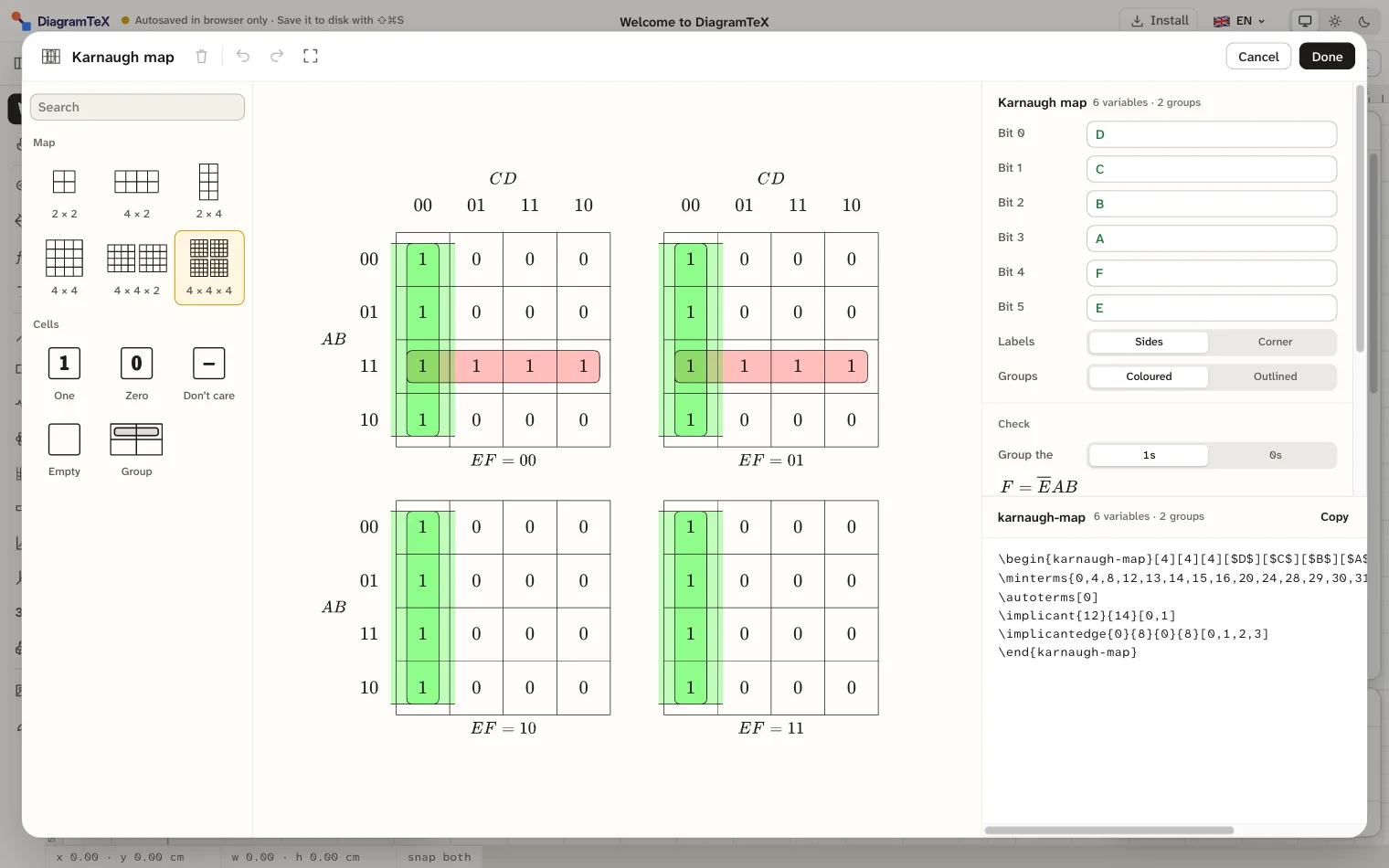
karnaugh-map code on the right.How to make a Karnaugh map
- Add a Karnaugh map block: open DiagramTeX, click the cube on the left rail, pick K-map and click the canvas. Double-click the block to open its editor.
- Fill the cells: click a cell to step through 0, 1 and don’t care, or paint cells with 1, 0 and D.
- Group them: drag across cells to draw a group; groups wrap round the edges. Or press Find Groups for a smallest cover.
- Copy the code: press Done, then CtrlE (⌘E on a Mac) and Copy.
Example: Six-variable Karnaugh map with cross-map groups
This is the code DiagramTeX writes for the map in the picture above: the cells as \minterms and each group as an implicant.
karnaugh-map snippetOpen it in DiagramTeX and edit it
% Requires: \usepackage{tikz} \usepackage{karnaugh-map}
\begin{tikzpicture}[x=1cm, y=1cm]
  \node[inner sep=0pt] at (7.27,-7.61) {\pgfinterruptpicture%
  \begin{karnaugh-map}[4][4][4][$D$][$C$][$B$][$A$][$F$][$E$]
  \minterms{0,4,8,12,13,14,15,16,20,24,28,29,30,31,32,36,40,44,48,52,56,60}
  \autoterms[0]
  \implicant{12}{14}[0,1]
  \implicantedge{0}{8}{0}{8}[0,1,2,3]
  \end{karnaugh-map}%
  \endpgfinterruptpicture};
\end{tikzpicture}
The karnaugh-map environment inside can also go straight into your document on its own, with \usepackage{karnaugh-map} in the preamble.
What the Karnaugh map editor does
- 2 to 6 variables: five and six variables are drawn as two or four submaps, as the package draws them.
- Groups that wrap: groups can wrap round the edges and cross submaps.
- Smallest cover: Find Groups finds one for you, and the panel shows the simplified function.
- Don’t cares: mark them and they are used where they make a group bigger.
- Code both ways: the code beside the map follows every change, and the map follows the code when you edit it.
- Pictures too: export the map as SVG, PNG at any DPI, or PDF, for slides and worksheets.
Questions
- Which LaTeX package does the code use?
- The
karnaugh-mappackage from CTAN, which is in TeX Live and on Overleaf. The code’s first line names what to load. - Is it free?
- Yes. DiagramTeX is free and open source (GNU AGPLv3), with no account, no paid tier and no ads. The code it writes for you is yours to use however you like.
- Does it work with Overleaf?
- Yes. Copy the code into your project and add
\usepackage{karnaugh-map}. The LaTeX dialog can also download a.zipto upload to Overleaf. - Is my map uploaded anywhere?
- No. DiagramTeX runs in your browser and keeps your files there. Once it has loaded, it also works offline.