DiagramTeX/tikz-cd editor
Commutative diagrams for LaTeX
tikz-cd editor: draw the diagram, copy the LaTeX
Type objects into a grid, drag arrows between them, then label, bend or restyle each arrow. DiagramTeX writes the tikz-cd code as you go, ready to paste into Overleaf or any LaTeX document.
- Free and open source
- Works offline
- No sign-up
- Nothing is uploaded
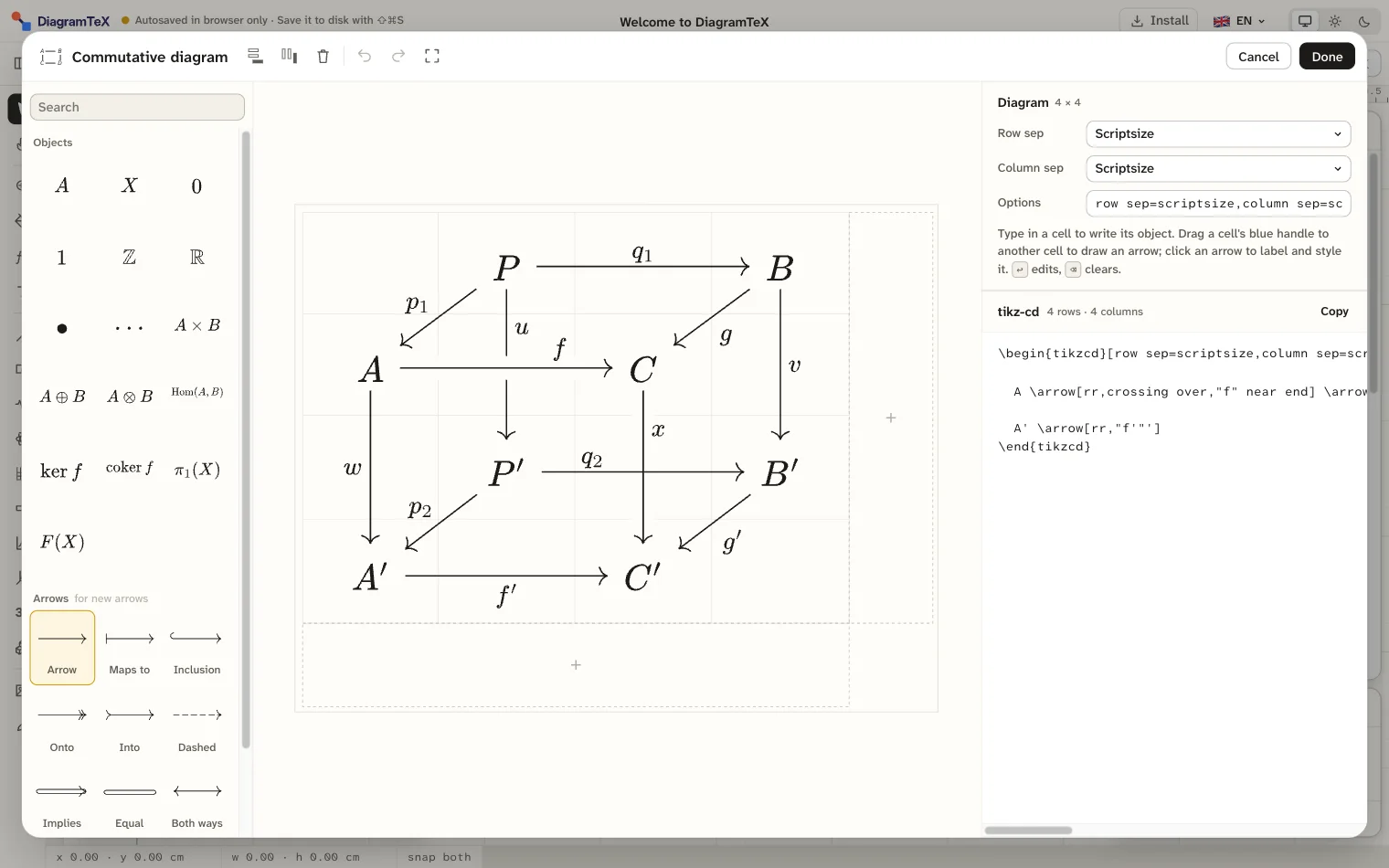
tikz-cd code on the right.How to draw a commutative diagram
- Add a CD block: open DiagramTeX, click the cube on the left rail, pick CD and click the canvas. Double-click the block to open its editor.
- Add objects: select a cell and type its LaTeX, or drop one from the palette.
- Draw arrows: pick an arrow style in the palette, then drag from cell to cell.
- Label or bend an arrow: select it and use the panel. Add Label puts a second label on it; Reverse swaps its ends.
- Copy the code: press Done, then CtrlE (⌘E on a Mac) and Copy.
Example: A commutative cube with crossing arrows
This is the code DiagramTeX writes for the commutative diagram in the picture above. The first line names the packages to load.
tikz-cd snippetOpen it in DiagramTeX and edit it
% Requires: \usepackage{tikz} \usepackage{tikz-cd}
\begin{tikzpicture}[x=1cm, y=1cm]
  \node at (3.82,-3.86) {\pgfinterruptpicture%
  \begin{tikzcd}[row sep=scriptsize,column sep=scriptsize]
  & P \arrow[dl,"p_1"'] \arrow[rr,"q_1"] \arrow[dd,"u" near start] & & B \arrow[dl,"g"] \arrow[dd,"v"] \\
  A \arrow[rr,crossing over,"f" near end] \arrow[dd,"w"'] & & C \\
  & P' \arrow[dl,"p_2"'] \arrow[rr,"q_2" near start] & & B' \arrow[dl,"g'"] \\
  A' \arrow[rr,"f'"'] & & C' \arrow[from=uu,crossing over,"x" near start]
  \end{tikzcd}%
  \endpgfinterruptpicture};
\end{tikzpicture}
What the editor does
- A grid of objects: type each one in LaTeX, typeset as you type.
- Arrow styles: pick a style in the palette and drag; label, bend or reverse an arrow in the panel.
- Code both ways: the code beside the diagram follows every change, and the diagram follows the code when you edit it.
- Bring diagrams in: paste a
tikzcdenvironment onto the canvas, including the code quiver writes, and it becomes a block you can edit. - xymatrix too: Convert to xymatrix in the panel writes the same diagram for the
xypackage. - Pictures too: export the diagram as SVG, PNG at any DPI, or PDF, for slides and notes.
Questions
- Is it free?
- Yes. DiagramTeX is free and open source (GNU AGPLv3), with no account, no paid tier and no ads. The code it writes for you is yours to use however you like.
- Does it work with Overleaf?
- Yes. Copy the code into your project and add
\usepackage{tikz-cd}. The LaTeX dialog can also download a.zipto upload to Overleaf. - Is my diagram uploaded anywhere?
- No. DiagramTeX runs in your browser and keeps your files there. Once it has loaded, it also works offline.