DiagramTeX/tikz-feynman editor
Feynman diagrams for LaTeX
tikz-feynman editor: draw the diagram, copy the LaTeX
Place vertices, drag propagators between them and pick each line’s kind with one key. DiagramTeX writes the tikz-feynman code as you draw, ready to paste into Overleaf or any LaTeX document.
- Free and open source
- Works offline
- No sign-up
- Nothing is uploaded
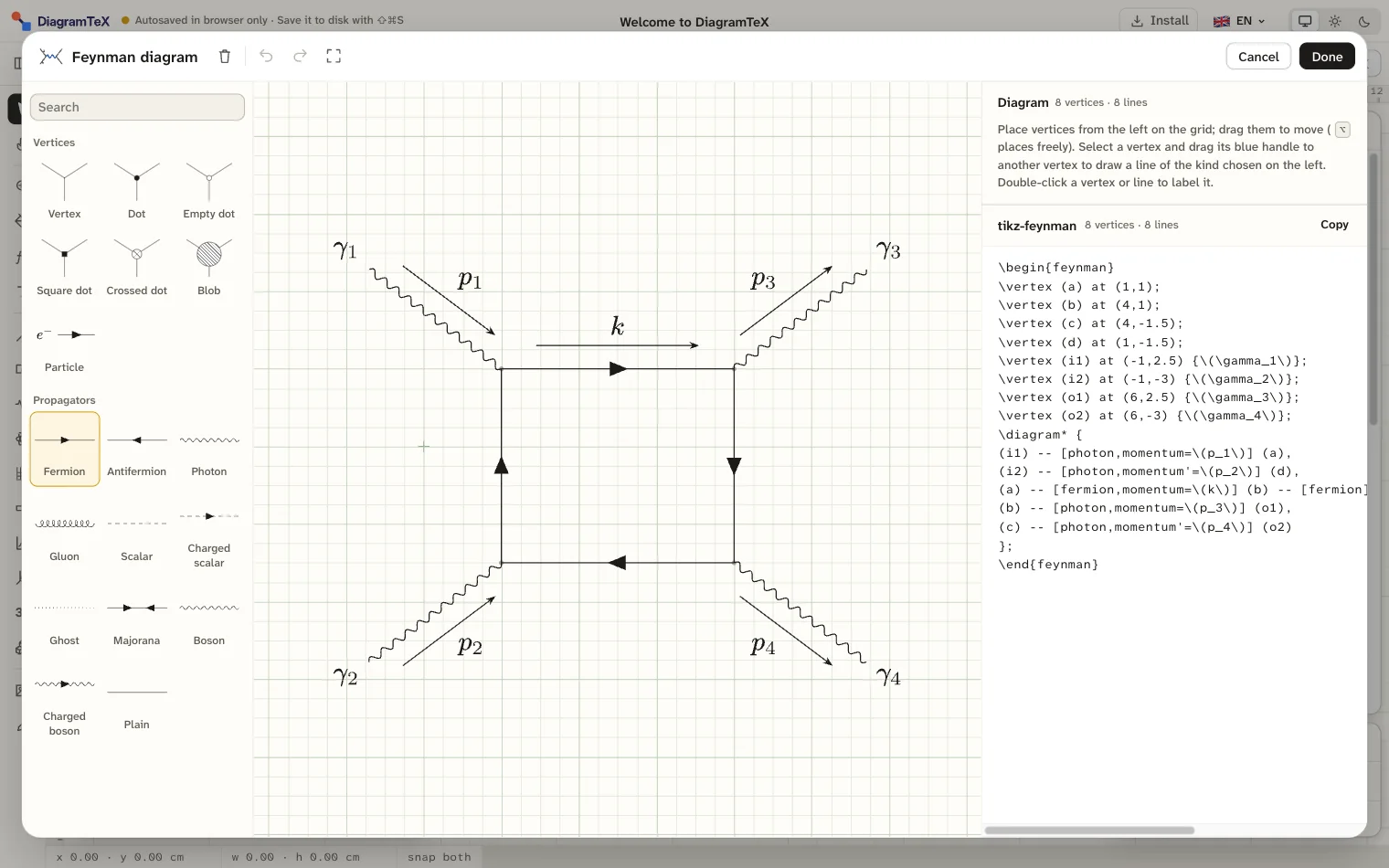
tikz-feynman code on the right.How to draw a Feynman diagram
- Add a Feynman block: open DiagramTeX, click the cube on the left rail, pick Feynman and click the canvas. Double-click the block to open its editor.
- Place vertices: click a vertex in the palette, then the grid.
- Draw a propagator: drag a vertex’s blue handle to another vertex.
- Pick its kind: with the line selected, press F fermion, P photon, G gluon, S scalar, M Majorana or B boson.
- Label, bend or add momentum: select the line and use the panel. Right-click it to reverse it.
- Copy the code: press Done, then CtrlE (⌘E on a Mac) and Copy.
Example: One-loop four-photon box diagram
This is the code DiagramTeX writes for the Feynman diagram in the picture above. The first line names the packages to load.
tikz-feynman snippetOpen it in DiagramTeX and edit it
% Requires: \usepackage{tikz} \usepackage[compat=1.1.0]{tikz-feynman}
\begin{tikzpicture}[x=1cm, y=1cm]
  \begin{scope}[shift={(2.69,-4.8)}]
  \begin{feynman}
  \vertex (a) at (1,1);
  \vertex (b) at (4,1);
  \vertex (c) at (4,-1.5);
  \vertex (d) at (1,-1.5);
  \vertex (i1) at (-1,2.5) {\(\gamma_1\)};
  \vertex (i2) at (-1,-3) {\(\gamma_2\)};
  \vertex (o1) at (6,2.5) {\(\gamma_3\)};
  \vertex (o2) at (6,-3) {\(\gamma_4\)};
  \diagram* {
  (i1) -- [photon,momentum=\(p_1\)] (a),
  (i2) -- [photon,momentum'=\(p_2\)] (d),
  (a) -- [fermion,momentum=\(k\)] (b) -- [fermion] (c) -- [fermion] (d) -- [fermion] (a),
  (b) -- [photon,momentum=\(p_3\)] (o1),
  (c) -- [photon,momentum'=\(p_4\)] (o2)
  };
  \end{feynman}
  \end{scope}
\end{tikzpicture}
What the editor does
- Every propagator: fermion, photon, gluon, scalar, Majorana and boson lines, each one key.
- Labels and momenta: LaTeX labels and momentum arrows on any line, typeset as you type.
- Bent lines: bend a propagator from the panel.
- Code both ways: the code beside the diagram follows every change, and the diagram follows the code when you edit it.
- Bring diagrams in: paste a
tikzpictureholding afeynmanenvironment and it becomes a block you can edit. - Pictures too: export the diagram as SVG, PNG at any DPI, or PDF, for slides and papers.
Questions
- Is it free?
- Yes. DiagramTeX is free and open source (GNU AGPLv3), with no account, no paid tier and no ads. The code it writes for you is yours to use however you like.
- Does it work with Overleaf?
- Yes. Copy the code into your project and add what its first line names (
\usepackage{tikz-feynman}). The LaTeX dialog can also download a.zipto upload to Overleaf. - Is my diagram uploaded anywhere?
- No. DiagramTeX runs in your browser and keeps your files there. Once it has loaded, it also works offline.